Implementing an OIDC Client
This section goes into details on how a client can be implemented. The client configuration in TrivoreID must reflect on the type of the client. RFC 8252 describes a best current practice on how to implement OpenID Connect authorization flow in public (non-confidential) native applications.
Authorization Code flow for confidential clients
The OpenID Connect has several different client profiles and auth grant types based on whether the client is able to keep the credentials secret.
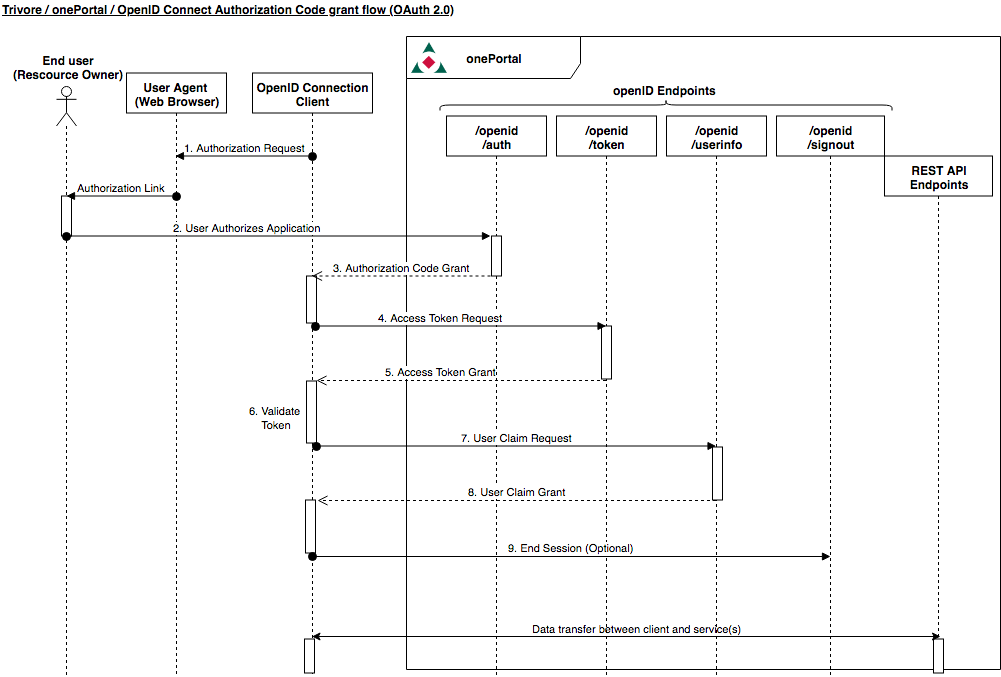
The most commonly used grant flow is the Authorisation Code Grant flow. The Authorization Code Grant flow can be used when the client is able to keep the client credentials secret. In this flow, the client is authenticated to the OpenID Provider (the onePortal platform) by using the client ID and secret. This flow is suitable for web applications with a back end, where the client credentials are kept out of reach of the users.
Listing 3 shows an example where the Authorization Code Grant flow is used. In a real situation this flow would be used in a web application, where the end user would be automatically redirected to the onePortal login page and after authorizing the client, the end user would be redirected back to the client application.
from requests_oauthlib import OAuth2Session

# Uncomment to allow use of http instead of https.
# Use http only for testing!
# import os
# os.environ['OAUTHLIB_INSECURE_TRANSPORT'] = '1'


# The client ID and secret obtained from the onePortal platform, replace these
CLIENT_ID = r'3543289205522754'
CLIENT_SECRET = r'change_me'

# The URL where the client is redirected after a successful authentication
# Change to accommodate your setup. This should be something like https://myapp.com/after_login
REDIRECT_URI = 'https://example.com'

# The address of the OpenID Connect Provider (the onePortal platform)
host_address = 'https://fi.trivoreid.com'

# Scopes define the information that your application is requesting access to
# For a complete list of available scopes, please see $host_address/.well-known/openid-configuration
scope = ['email', 'openid', 'profile', 'phone', 'address']

oauth = OAuth2Session(CLIENT_ID, redirect_uri=REDIRECT_URI, scope=scope)

authorization_url, state = oauth.authorization_url('%s/openid/auth' % host_address)

print('Please go to {} and authorize access.'.format(authorization_url))

authorization_response = input('Enter the full callback URL')

token = oauth.fetch_token(
    '%s/openid/token' % host_address,
        authorization_response=authorization_response,
        client_secret=CLIENT_SECRET
        )

r = oauth.get('%s/openid/userinfo' % host_address)

print(r.text)
print(r.headers)
Authorization Code grant flow with public clients
When the client is public, it, by definition, cannot securely store the client secret. Therefore the client cannot be authenticated during the access token request. This leaves the end-user vulnerable against various attacks explained in RFC 8252. Additionally the RFC 8252 describes best practices on how to configure native applications acting as a public OIDC clients.
All in all, in order to protect the end-user’s credentials, a public client must use an external user-agent (e.g. web-browser) and additionally use the Proof Key for Code Exchange (PKCE) described in RFC 7636 when requesting the access token. PKCE mitigates authorization code interception attacks, where an adversary intercepts the authorization code when it is returned by the external user-agent.
Basically the PKCE is a cryptographically random secret created by the client. When the client request the authorization code, it sends a transformed version of the secret along with the request. The request also contains information on how the transformation was done.
Transformation methods are at the moment either “plain” or “S256”. The “plain” method exists mainly for compatibility reasons and it sends the PKCE in plain text. This method offers no protection against eavesdroppers and should not be used.
The “S256” code challenge method, however, uses the following function to create the code challenge value:
code_challenge = BASE64URL-ENCODE(SHA256(ASCII(code_verifier)))
Example Python code for transforming the code challenge is provided later.
Using the Implicit grant flow
Another flow used in OpenID Connect is the implicit grant flow. In this flow the client credentials are not expected to remain confidential and can be distributed along with the application, which can be a stand-alone JavaScript web or a mobile application. In the implicit grant flow the client receives all tokens from the authorization endpoint.
Listing Error: Reference source not found shows an example of the use of the implicit grant flow.
Note that when developing a desktop application, there has to be some way to pass the access token and the ID Token to the application. The easiest way to do this is to redirect the client to http://localhost (http scheme is allowed only when redirecting to localhost) and let the end user know that the url has to be manually copy-pasted from the browser window to the application.
A more clever way would be to embed a tiny web server to the application and listen to a port that is known to be often available, like 8888. However, as the access token and the ID Token are passed as fragments, they are actually never sent to the server. A way around this would be to embed a small piece of JavaScript code to the served web page that could extract the values from the fragment and send them to the server. This kind of a scheme is out of scope of this document, though.
Using the Resource Owner Password Credentials Grant
Using this is not recommended due to security reaons.
Using the Client Credentials Grant
The client credentials grant is used when the client has to perform some actions on its own behalf. Currently, there are no real use-cases for this, but it client credentials grant is supported, however. In client credentials grant, the client will authenticate and authorize itself instead of users authorizing the client.